
The Importance of Restarting and Shutting Down Your Laptop

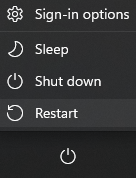
Introduction: As dependable companions in our digital lives, laptops require regular care and maintenance to ensure optimal performance. One crucial aspect often overlooked is the necessity of restarting and shutting down your device. In this tech support article, we delve into the reasons why these seemingly mundane actions are essential for the health and efficiency of your laptop.
- Memory Management and Performance Optimization:
- Over time, as you use your laptop, various programs and processes accumulate in its memory (RAM). Restarting your laptop clears out this memory, effectively closing all running applications and freeing up system resources.
- By initiating a fresh boot, your laptop can allocate resources more efficiently, leading to improved performance and responsiveness. This is particularly noticeable if you’ve been using resource-intensive applications or multitasking extensively.
- Software Updates and System Stability:
- Software updates are regularly released by operating system developers and application providers to address security vulnerabilities, add new features, and enhance performance.
- Many updates require a system restart to be fully applied. Failing to restart your laptop can result in incomplete updates, leaving your system vulnerable to security threats and potentially causing compatibility issues with other software.
- Regularly shutting down and restarting your laptop ensures that updates are applied promptly, contributing to the overall stability and security of your system.
- Preventing Memory Leaks and Software Glitches:
- Extended periods of continuous usage can lead to memory leaks and software glitches. Memory leaks occur when programs fail to release allocated memory after use, gradually depleting system resources.
- Restarting your laptop flushes out these memory leaks and resets software components, reducing the likelihood of encountering glitches, freezes, or crashes.
- Additionally, some software may not function correctly after running for an extended period without a restart. Rebooting your laptop periodically can help mitigate these issues and maintain smooth operation.
- Hardware Maintenance and Cooling:
- Continuous operation generates heat within your laptop, especially if you’re engaged in demanding tasks such as gaming or video editing. Shutting down your laptop allows the internal components to cool down, preventing potential overheating and prolonging the lifespan of hardware components.
- Additionally, restarting your laptop helps in diagnosing and resolving hardware-related issues. It allows the system to perform self-checks during the boot process, identifying any potential hardware failures or abnormalities.
- Enhanced Battery Life:
- For laptops powered by rechargeable batteries, shutting down the device when not in use can extend battery life. Leaving a laptop in sleep or hibernate mode still consumes power, albeit at a reduced rate.
- By shutting down your laptop, you conserve battery power and reduce the frequency of charging cycles, which can contribute to the longevity of your battery.
Conclusion: In conclusion, the seemingly simple acts of restarting and shutting down your laptop play a crucial role in maintaining its health, performance, and longevity. By incorporating these practices into your routine, you can ensure that your device operates smoothly, remains secure, and delivers optimal performance throughout its lifespan. Remember, a well-maintained laptop is a reliable companion in your digital endeavors.


